.webp)
Odoo is one of the most widely used open-source ERP platforms in Europe, powering everything from inventory management and accounting to point-of-sale operations. Thanks to its modular architecture and flexible API, Odoo can be deeply integrated into modern financial and commerce stacks.
In this article, we’ll explore how to succeed with an Odoo API integration using Chift. We’ll cover how to access and authenticate with the API, the technical constraints and limits you should be aware of, best practices for building stable integrations, and the most common use cases across Odoo’s Invoicing, Accounting, and POS modules.
Odoo API overview
The Odoo API is free to use for all customers on the Custom Plan. For more details about plans and pricing, Odoo provides up-to-date information on their pricing page.
Odoo exposes a powerful API layer that allows external systems to interact with core business data. Through the API, integrations can create and manage invoices, synchronize accounting entries, retrieve POS orders and payment information, and safely operate in multi-company environments.
JSON-RPC: The Future of Odoo APIs
Historically, Odoo offered an XML-RPC API. This interface has now been deprecated in favor of JSON-RPC, which provides a more modern and consistent way to interact with Odoo’s backend.
Starting at the end of 2026 with Odoo version 20, JSON-RPC will be the only supported API. If you are building or maintaining integrations today, relying exclusively on JSON-RPC is strongly recommended to avoid future migration work and ensure long-term compatibility.
Connect to all popular solutions with a single integration
Discover how Chift's Unified APIs have helped software vendors quickly add dozens of integrations.
Authentication: How to access the Odoo API
Accessing the Odoo API requires the creation of an API key directly within the Odoo instance. This API key is then used as the password when authenticating API requests through JSON-RPC, alongside the database name and user credentials.
Using API keys improves security by allowing credentials to be revoked or rotated independently, without impacting user accounts or ongoing integrations.
Rate limits and Aacceptable use
To protect platform stability, Odoo enforces acceptable use limits on API calls.
- Typical acceptable rate: ~1 call per second
- No parallel calls for sustained usage
- Throttling may occur if limits are exceeded
These limits are designed for business workflows, not high-frequency real-time systems. Efficient request design is essential for a successful integration.
Best practices for Odoo API integrations
To build a robust and scalable integration with Odoo, we strongly recommend following these best practices:
1. Batch your requests
Group CRUD operations whenever possible to:
- Reduce API calls
- Avoid rate-limit throttling
- Improve overall performance
2. Respect Odoo’s Open-Core logic
Odoo is open core, meaning business logic often lives directly in the source code. Before updating or writing field values:
- Review Odoo’s implementation on GitHub
- Ensure you are not bypassing computed fields, constraints, or automated workflows
This helps avoid breaking standard Odoo behavior during upgrades or data synchronization.
3. Always handle Multi-Company contexts
Odoo supports multi-company databases.
When making API requests:
- Always specify the correct company ID(s)
- Ensure your context matches the intended company
Failing to do so may result in access rule errors or data inconsistencies.
What can you do with an Odoo API integration?
Connecting to Odoo through Chift unlocks a wide range of use cases for software companies building financial, accounting, and commerce solutions. Thanks to Odoo’s modular architecture and Chift’s dedicated connectors, you can reliably access invoicing, accounting, and point-of-sale data while respecting Odoo’s business logic and API constraints.
Here are some of the most common and high-value use cases enabled through an Odoo API integration.
Synchronizing customers, products, and master data
Information store on Odoo like customers, suppliers, products, and fiscal configurations can be synchronized across systems.
By retrieving and pushing master data through the Odoo Invoicing, Accounting and POS APIs, you ensure consistent records across systems, reduce manual corrections, and maintain data quality for end users.
.jpeg)
Automating invoice creation and lifecycle management
With the Odoo Invoicing API, external platforms can fully automate invoice workflows directly in Odoo. This use case is especially valuable for:
- CRM and ERP platforms
- Invoicing and billing solutions
- Pre-accounting and finance tools
This is a core use case for SaaS platforms that generate invoices but rely on Odoo for fiscal compliance and accounting continuity.
.jpeg)
Powering pre-accounting and bookkeeping workflows
Pre-accounting and expense management tools can export structured financial data directly into Odoo using the Accounting API.
Typical workflows include:
- Creating journal entries from expenses, invoices, or payroll data
- Exporting validated accounting entries to Odoo
- Reducing manual data entry for accountants and SMEs
This significantly shortens the path from operational data to compliant accounting and improves collaboration between finance tools and accounting teams.
.jpeg)
Centralizing POS sales data and retail performance
For retail and hospitality businesses, the Odoo POS API enables access to detailed sales and payment data generated at the point of sale.
Typical use cases include:
- Retrieving POS orders, line items, and payments
- Synchronizing POS sales into accounting systems
- Consolidating sales data across multiple stores or locations
This is particularly valuable for analytics platforms, multi-store operators, and finance teams looking to centralize retail performance data.
.jpeg)
Cash flow forecasting and financial visibility
Accounting and invoicing data stored in Odoo can be retrieved to power cash flow forecasting and financial reporting features.
With access to open invoices, payments, and accounting balances, your users can:
- Anticipate future cash movements
- Improve liquidity planning
- Make more informed financial decisions
This use case is central to cash flow management, financial planning, and reporting software.
.jpeg)
Enabling financial data access for reporting and decision-making
Odoo accounting data can also be used to power:
- Financial dashboards and KPIs
- Business performance reporting
- Eligibility checks or internal risk analysis
By exposing structured financial and sales data through your product, you enable faster, data-driven decisions while keeping Odoo as the system of record.
.jpeg)
For more examples of how integrations can improve your product, explore our Chift case studies.
One integration to connect Odoo with the rest of your tools stack
Connecting Odoo is often only one part of a broader accounting and invoicing ecosystem. Many software products also need to integrate with multiple accounting tools across different countries and user profiles.
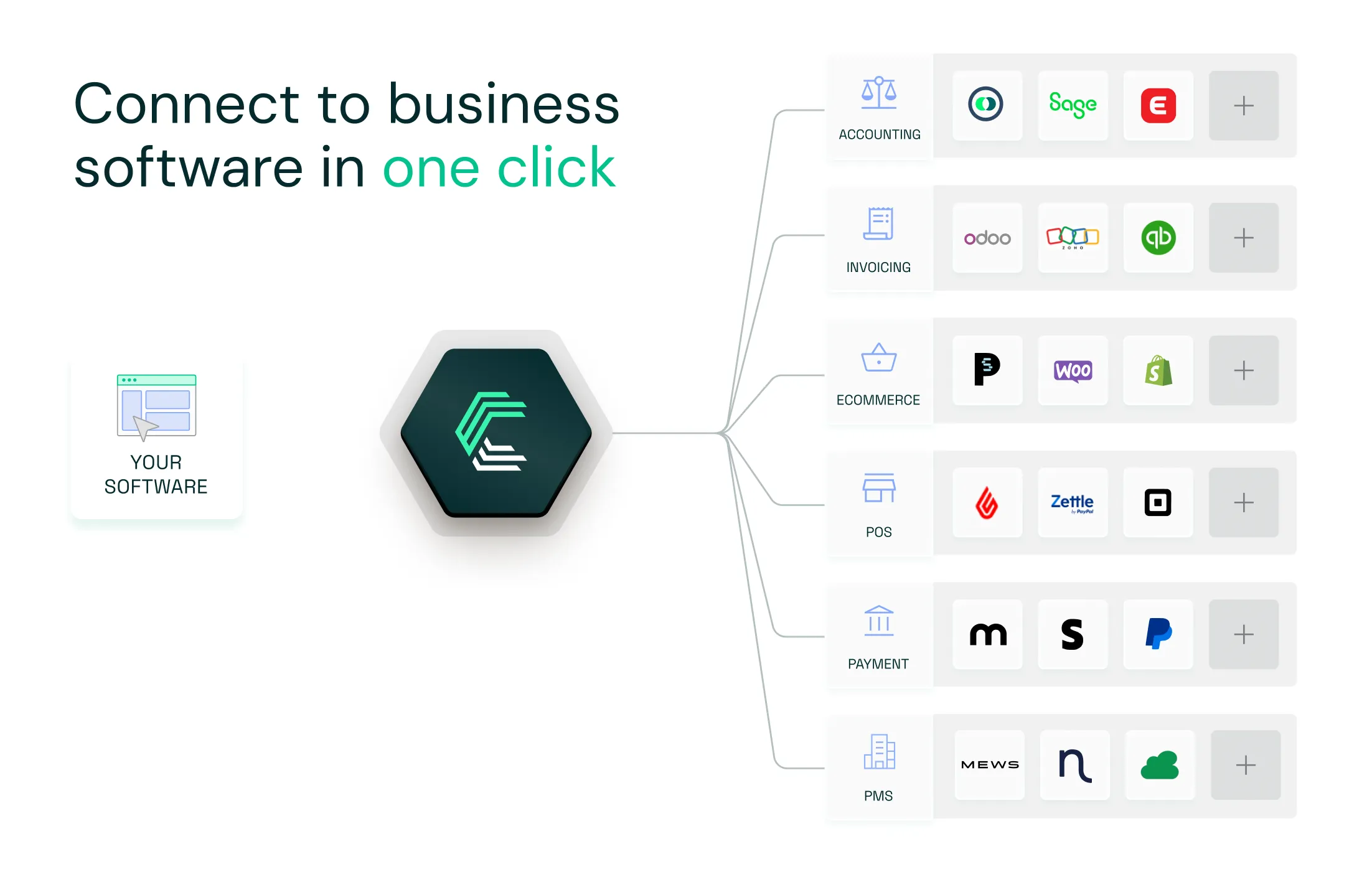
With Chift’s Unified Accounting API, you connect once and access Exact Online, Holded, QuickBooks, Xero, Sage Génération Experts, Pennylane, and many more tools through one consistent data model.
Here’s what you get:
✅ Single integration for dozens of accounting tools
✅ Built-in support for OAuth2, pagination, bulk sync, and rate limits
✅ Unified and standardized data
✅ Real-time sync and advanced monitoring
✅ Seamless experience for your users (yes, even on-premise)
Your team saves time. Your users get what they need faster. Your product scales smarter.
Frequently Asked Questions about the Odoo API
What is Odoo API integration?
Odoo API integration is the technical implementation of an Odoo integration using Odoo’s JSON-RPC API. It allows external applications to programmatically interact with Odoo modules such as Invoicing, Accounting, and POS.
Through an API integration, software platforms can create, read, update, and retrieve business data while respecting Odoo’s business logic, access rules, and multi-company configuration.
Is the Odoo API free to use?
Yes. The Odoo API is free for customers on the Custom Plan. Usage is subject to Odoo’s acceptable use and rate-limit policies.
Does Odoo integrate with other apps?
Yes. Odoo integrates with a wide range of third-party applications, including invoicing tools, accounting platforms, e-commerce systems, POS software, and financial services.
These integrations can be built directly using the Odoo API or implemented through integration platforms like Chift, which provide standardized connectors and handle API constraints, authentication, and data mapping.
What is the disadvantage of using Odoo?
While Odoo is a powerful and flexible ERP, there are some limitations to consider:
- API rate limits restrict high-frequency or parallel API calls
- Complex business logic requires a good understanding of Odoo’s internal models
- Multi-company setups require careful handling of company context in API requests
These challenges can be mitigated by following best practices and using integration layers designed to work with Odoo’s architecture.
Does Odoo support multi-company setups via the API?
Yes. Odoo supports multi-company databases, but API requests must explicitly include the correct company context to avoid access issues.
Can I use Odoo API for real-time high-volume traffic?
Odoo APIs are designed for business workflows, not high-frequency real-time systems. Calls are typically limited to around 1 request per second, with no parallel calls.
How to get your Odoo API key
Getting started with Odoo requires generating an API key in your Odoo account. Our Odoo API key step-by-step guide will show you how.
.webp)