What is a Claude dashboard?
Picture Monday morning. You open Claude and type: "Build me a dashboard with revenue by channel, cash position and overdue invoices for this quarter." A few seconds later you're looking at KPIs, charts and tables in one interactive view, built on your company's own numbers. You can keep it, refine it with a follow-up question and share it with your team.
That's a Claude dashboard. Claude builds it as an artifact from a prompt, so there's no BI tool to set up, no export to run and no spreadsheet to rebuild every month.
Claude handles the layout. The numbers come from the data source behind it, and with Chift Insights that source is your accounting, your bank, your tills and your web shop at once.
One tool, one slice
Most AI connectors cover a single tool. Connect your accounting software and you see your books. Connect your bank and you see your transactions. You can add several connectors, but each one speaks its own language, and Claude is left to reconcile and add up the numbers on its own.
The questions that keep a finance team up at night sit between those tools. Is cash getting tight because a large customer is paying late? Do last month's POS sales match what's been booked? Is a margin slipping because of a supplier nobody has looked at in a while? To answer any of them, the dashboard has to see all of your tools at once.
The open banking wall
Open banking gives near real-time access to transactions, but often very little history. Many European banks use a PSD2 exemption to cap what they share at the last 90 days.
How far back you can go depends on the bank, and Europe tends to be on the short side. UK banks often share several years of history, while a European bank is more likely to stop at 90 days.
Three months of bank data can't show year-on-year growth or seasonality, and it can't tell you how last year's Q4 compares with this one.
Where the rest of the history lives: open accounting
The missing years are already in your accounting software. Journal entries, invoices, payments, VAT and ledger accounts go back a long way, and you or your accountant have already categorized and reconciled them.
Connect your accounting software next to your bank and your Claude dashboard gets the depth that bank feeds lack. Open banking covers the last few weeks as they happen. Open accounting covers everything before, with the context of what each entry was for. You decide how much history Chift loads, from the last year to your full history.
Your bank tells you what happened. Your accounting tells you what it means.
Banking data shows money moving: what came in, what went out and what your balance is right now. Accounting data explains the movement. It tells you which invoices are still unpaid, how old your receivables are, how much you spend with each supplier and how much VAT you owe.
Cash flow is where the two meet. Chift Insights lines up your accounting entries with your bank balances, so you see where your cash really stands and what's still due in or out, even when the books are a few weeks behind.
POS, e-commerce and payments
For a lot of businesses, revenue starts at a checkout or in a web shop, long before it reaches the accounting software. Chift Insights brings those sources in too: POS systems like Lightspeed and Shopify POS, e-commerce platforms like Shopify, WooCommerce and PrestaShop, and payment tools like Stripe and GoCardless.Once everything sits in one place, Claude can answer questions that no single tool can:
- Revenue by channel, with POS, e-commerce and invoicing side by side in one chart.
- This month's payment mix: how much came in by card, by cash and through each payment provider.
- Last month's POS sales by VAT rate, next to what's been booked for the same period.
- Which customers to chase first, with overdue invoices ranked by amount and age.
How do you connect your tools to a Claude dashboard?
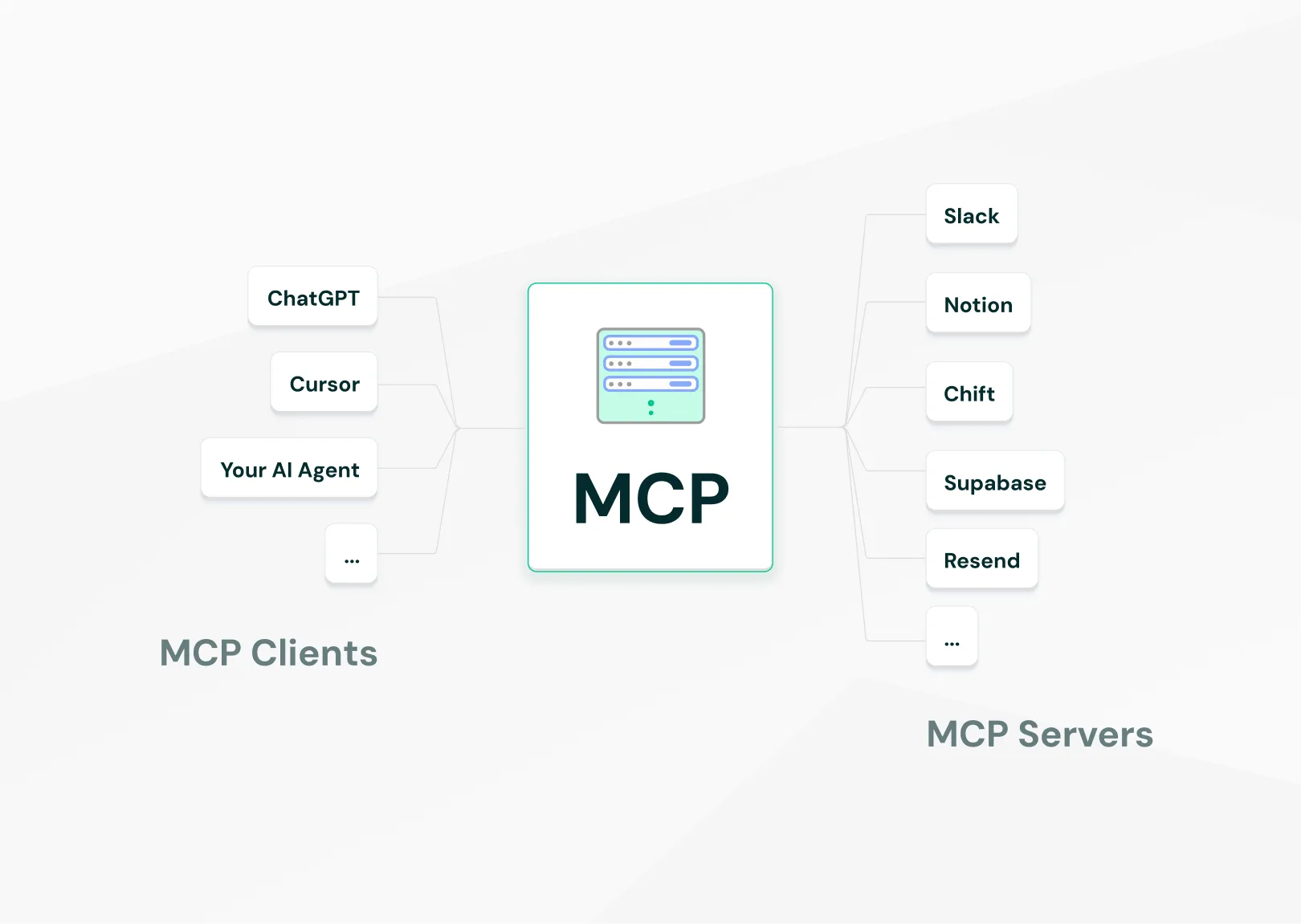
Through Chift's MCP server. MCP (Model Context Protocol) is the open standard Claude uses to reach external data. You add Chift once and every financial tool you've connected comes with it, so there's no connector to add per tool.Here's the setup with Chift Insights:
- Add Chift Insights to Claude as a connector, using the Chift MCP URL.
- Sign in and connect your tools: accounting software like Sage, Cegid, Exact Online or Odoo, a POS like Lightspeed, your bank, your web shop and payment tools like Stripe.
- Authorise Claude to read your data through Chift.
- Ask Claude for your dashboard: "Show my revenue by channel over the last 12 months, with my cash position and overdue invoices."
It takes a few minutes and needs no technical project. When you add a tool later, you connect it in Chift and it shows up in Claude as soon as its first sync is done, with nothing new to configure on the Claude side.
So whether you want to connect Lightspeed to Claude or get your Sage or Cegid data into a Claude dashboard, it's the same answer: one MCP for every tool. MCP is an open standard, so the same connection works with any other AI assistant that supports it.
Why you can trust the numbers on your dashboard
Before anyone shows a dashboard to a CFO or a board, they want to know where each figure came from. Chift Insights is built so that Claude reports figures from your data and never estimates them.
- Claude works from a curated set of measures and dimensions, such as "customer revenue" or "invoice date by month". It can't invent a field or join tables that don't belong together.
- Chift runs the calculations. It aggregates your entries by account type, revenue on one side and expenses on the other, and hands Claude totals computed from your own chart of accounts.
- Every monetary figure carries its currency, and Chift keeps a separate total for each one. EUR and USD are never added together.
- When the data for a question doesn't exist or doesn't go back far enough, Chift says it isn't available, and Claude tells you so.
- Each request is scoped to your own account and to the access you granted, and Chift Insights only reads your data. It never changes anything in your tools.
Get the full picture in your Claude dashboard
With Chift Insights, your bank, accounting, POS, e-commerce and payment data sit in one conversation. You get years of history from your books on top of the bank's 90 days, figures computed from your accounts, and interactive charts whenever you ask for them, all set up in a few minutes.
Chift Insights is opening to its first users now. Try it and give your Claude dashboard the full picture.